Magic Mix and Perfection: what each does in S9 Sampler
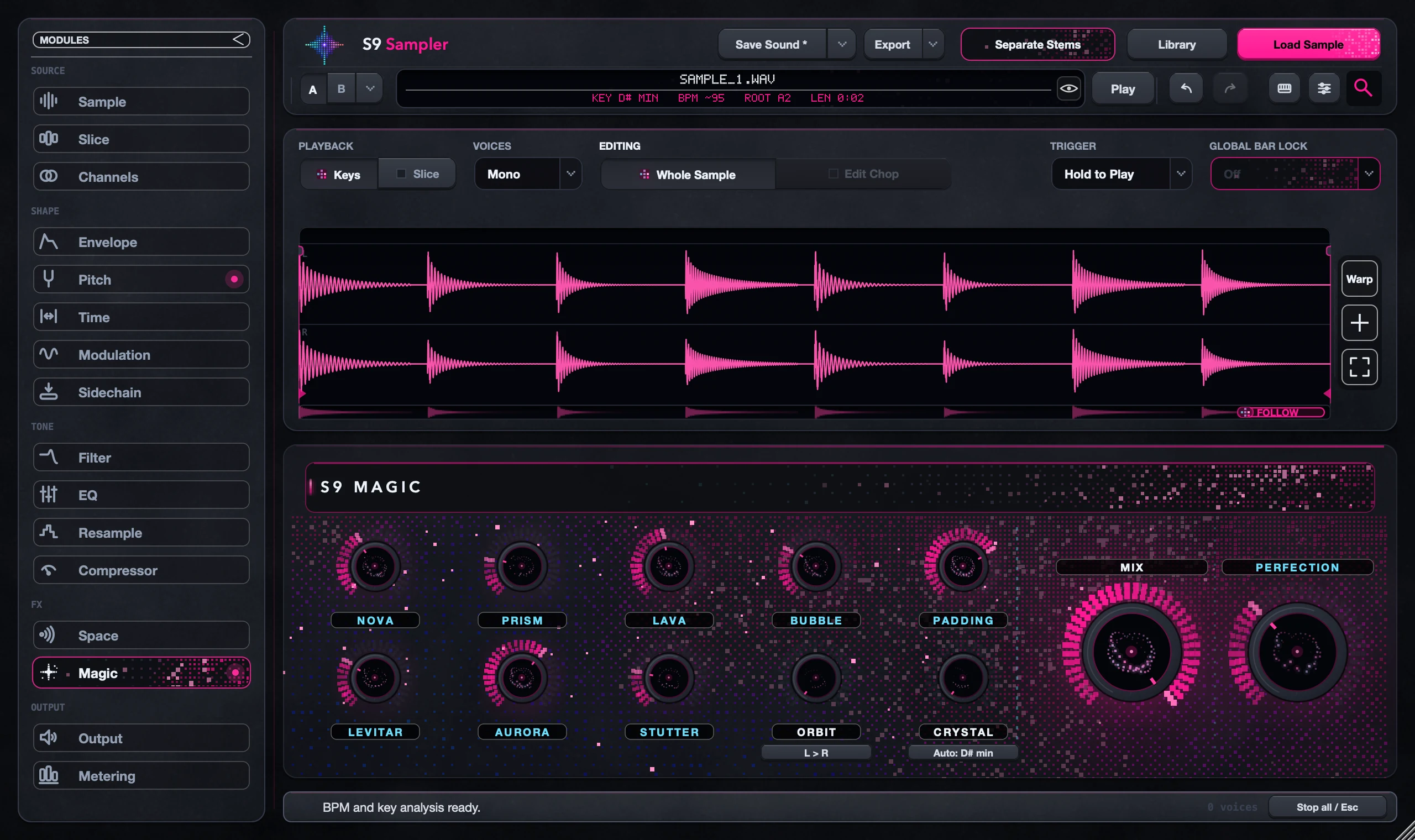
Magic Mix blends the combined Magic effects with your sound. Perfection has its own amount and doesn’t follow Magic Mix. So if you turn Magic Mix down and still hear processing, check Perfection.
Use them for two separate choices: how much Magic character you want, and whether Perfection helps the finished sound. Change one at a time.
For S9 Sampler 0.1.6 (paid beta). More help inside the app: Help & Shortcuts → Effects & mixing.
Step by step
Keep a reference
Play a short phrase. Put an alternative on A/B if you want to compare full versions.
Set the Magic character
Turn the Magic effects you want, then use Magic Mix to blend them in. Listen in the track.
Set Perfection
Adjust Perfection’s own amount and compare again. With Magic Mix at zero, Perfection still works.
Keep the balance
Play a few notes and check Output. Save Sound to keep it, or Save FX Preset to reuse it.
Good to know
Lost track?
Put one control back and listen to the other. A/B is easier than remembering knob positions.
Magic is shared
Magic shapes the whole sound. Selecting a Chop doesn’t give that Chop its own Magic.
7 days, all features, no card, no automatic charge.